
Orqaa – An Intelligent platform for hotel operations
One app for every department, every shift, and every property you own. Front desk, housekeeping, maintenance, laundry — all working from the same list, all visible to you in real time.
Built for leading hospitality brands across economy, midscale, and upper-midscale hotels.
Why Orqaa
Right now the morning shift writes the drawer count on a legal pad. Housekeeping tells the front desk about a broken AC unit in 214, and the front desk forgets to tell maintenance. Somebody’s cousin has the number for the plumber. The filter that needed cleaning on Monday is still dirty on Thursday — and nobody knows, because the person who wrote that checklist quit in March.
Orqaa replaces all of it with one list, one status, one record. Every department works from the same board. Every completed job is timestamped against a name. Nothing closes out just because a shift ended — a task stays up until someone actually does it. And when your GM leaves, the operation doesn’t leave with them.
Tasks Completed
Rooms Inspected Daily
Shift Reports Delivered
Every feature built around the real daily work of hotel staff — not generic project management dressed up for hospitality.
Drop in your brand standards document — PDF, Word, or Excel. Orqaa's AI reads it, extracts every operational task, and organises them into the right department and subcategory automatically. No manual data entry. No spreadsheets. No weeks of setup.
Works with any hotel brand. Any document format.
Housekeeping flags a broken fridge. Maintenance sees it instantly, fixes it, and closes the loop — all in Orqaa. No WhatsApp messages. No radio calls. No Post-it notes left at the desk.
Housekeeping · Maintenance · Front Desk · F&B · Management · Supplies · Laundry · Safety & Standards
Your brand standards, compliance deadlines, and inspection tasks live in Orqaa — loaded automatically from your brand manual. When the QA auditor arrives, you're not hunting for logs. You're ready.
IHG · Hilton · Marriott · Independent — all supported.
Clear shift workflows, room checklists, and task subcategories mean your team spends less time guessing and more time delivering. Every colleague knows what's expected from the moment they clock in.
Shift summaries sent to GM at end of every shift.
When a team member leaves unexpectedly, everything they knew walks out with them — unless it lives in Orqaa. Every workflow, every checklist, every handover is already in the system. A new colleague picks up exactly where they left off. No chaos. No gaps. No guest ever knows.
Create your account
Upload brand standards
AI creates your workflows
You approve
First shift starts
Getting Started
You don’t build your task lists from scratch. Orqaa reads what you already have and does the first draft for you.
Brand standards, SOPs, your AM and PM checklists, maintenance manuals. PDF or Word, either works.
It pulls out every actionable item, strips the duplicates, and sorts what’s left by department and frequency.
Staff log in, confirm their shift, and see only their department. You get the report at end of shift.
When housekeeping flags an issue, maintenance sees it instantly. When front desk logs a complaint, management is notified in real time. Nothing falls through the cracks — so guests only ever see a hotel that has it together.
Great reviews come from great operations. Orqaa tracks what was done, what was missed, and what needed help — so you can see patterns before guests do. Fix the root cause, not just the complaint.
A leaking fridge caught today costs $50 to fix. Left for three weeks it costs $3,000 and a string of bad reviews. Orqaa's proactive maintenance schedules make sure nothing is forgotten — reducing costly reactive repairs and guest-facing failures.
Your brand standards, compliance deadlines, and inspection tasks live in Orqaa — loaded automatically from your brand's standards manual. When the QA auditor arrives, you're not hunting for logs. You're ready.
Clear task lists, shift summaries, and recognising who delivered means your team spends less time guessing and more time doing great work. Happy, informed staff stay longer — and guests notice the difference immediately.
When a team member leaves unexpectedly, everything they knew walks out with them — unless it lives in Orqaa. Every workflow, every checklist, every handover is already in the system. A new colleague picks up exactly where they left off. No chaos. No gaps. No guest ever knows.
See how much time and money your hotel can save with Orqaa’s all-in-one hotel management platform.
Enter a few details about your hotel to calculate your potential savings.
Your data is safe and secure with us.
Based on your inputs, Orqaa can help you save:
Experience the full power of Orqaa risk-free.
Inside the App
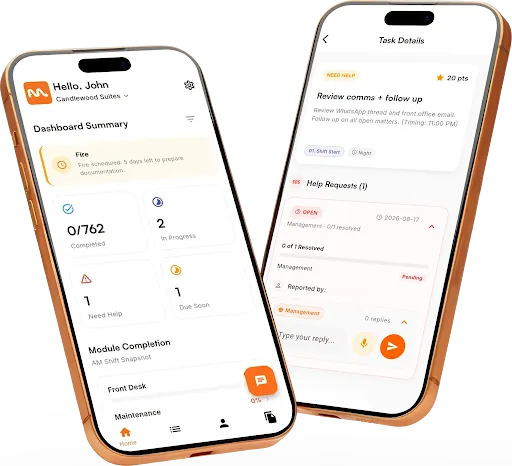
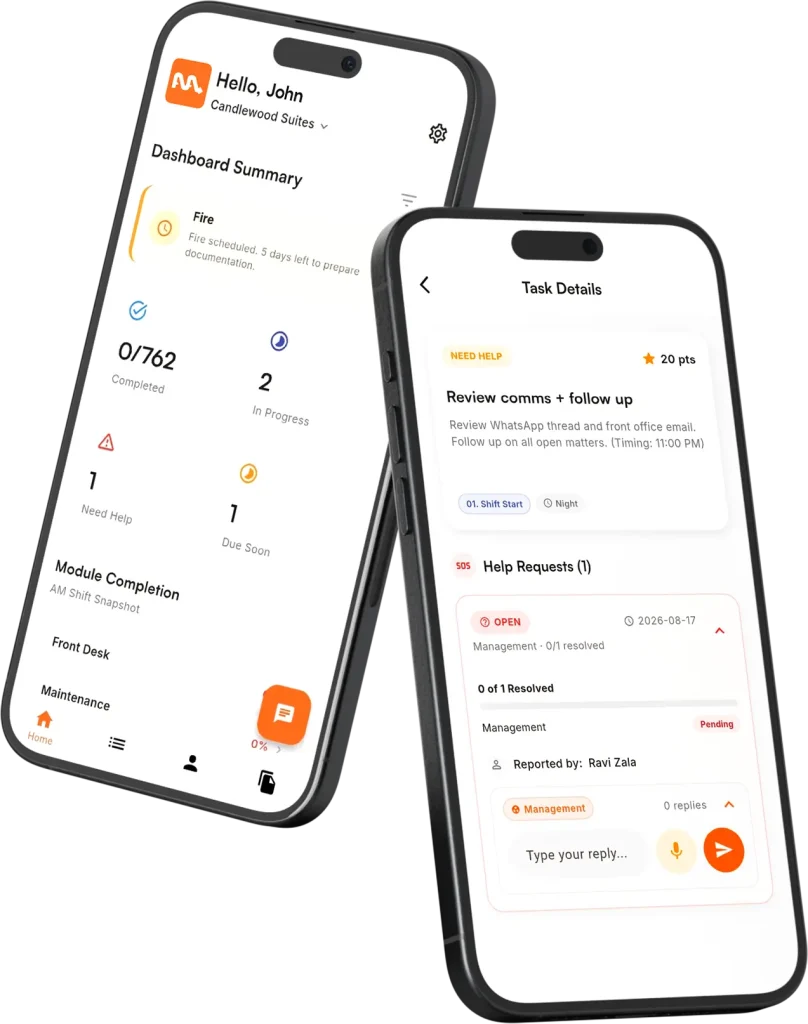
Today’s tasks plus yesterday’s leftovers, colour-coded, filterable by status and frequency, dragged into the order your team really works in.
A housekeeper who’d rather talk than type holds one button, says what she found in 214, and it saves straight to the task.
Flag a task red and the saved contact comes up — the plumber, the fire company, your GM. Call or text without leaving the screen.
Every property you own, every open issue, points earned this month, and a PDF shift report you can pull at any hour.
FAQs
A checklist tells you what should happen; it doesn't tell you what did. A group chat buries an urgent repair under a shift-swap request. Orqaa keeps one board per department where every task has a status, a name, and a timestamp — and unfinished work stays visible until it's dealt with.
Most properties are running the same day. Upload your brand standards or your existing checklists, and the AI drafts the task lists by department and frequency. You review, adjust the order, add your emergency contacts, and hand out the property code.
No. Employees log in with the property code and their name on their own phone — no email, no password, nothing for you to reset. Only owners and managers have full accounts, and those use two-factor login.
Yes. One login covers all of them, with a property dropdown to switch. Task lists, staff, and reports stay separate per property, and a list you build for one property can be copied across to the others.
$40 a month, or $400 a year. Every department and every feature is included, with unlimited staff accounts. You get 30 days free to start, and another 30 when you send us feedback — up to 60 days before you pay anything.
It carries over. A filter clean due Monday is still on the board Thursday until someone marks it done. If a task is genuinely blocked, staff flag it red — which alerts you and locks the task until a manager resolves it.
Get Started
Setup takes less than a day. Your team will notice the difference from the very first shift.

Notes on new features and on running a hotel better. Once a month at most, and easy to get out of.